
If you’ve spent any time researching IPTV, you’ve run into two very different kinds of “connection info”: a long M3U link that starts with http:// or https://, and a MAC address that your provider asks you to register. You may have also stumbled across GitHub repositories that claim to host free M3U playlists, or search terms like “m3u playlist text file iptv org” and “most popular m3u links shared online” promising instant access to thousands of channels.
This guide breaks down exactly what an IPTV URL is, how M3U differs from MAC-based activation, what “IPTV GitHub” actually refers to, and — just as important — what to watch out for before you paste any playlist into your player.
What Is an M3U Playlist, Exactly?
An M3U file is nothing more than a plain-text list of stream URLs. The format dates back to the 1990s, when it was created for early MP3 players, but it became the de facto standard for IPTV because almost every player — VLC, IPTV Smarters, TiviMate, GSE IPTV, and dozens of others — can read it natively.
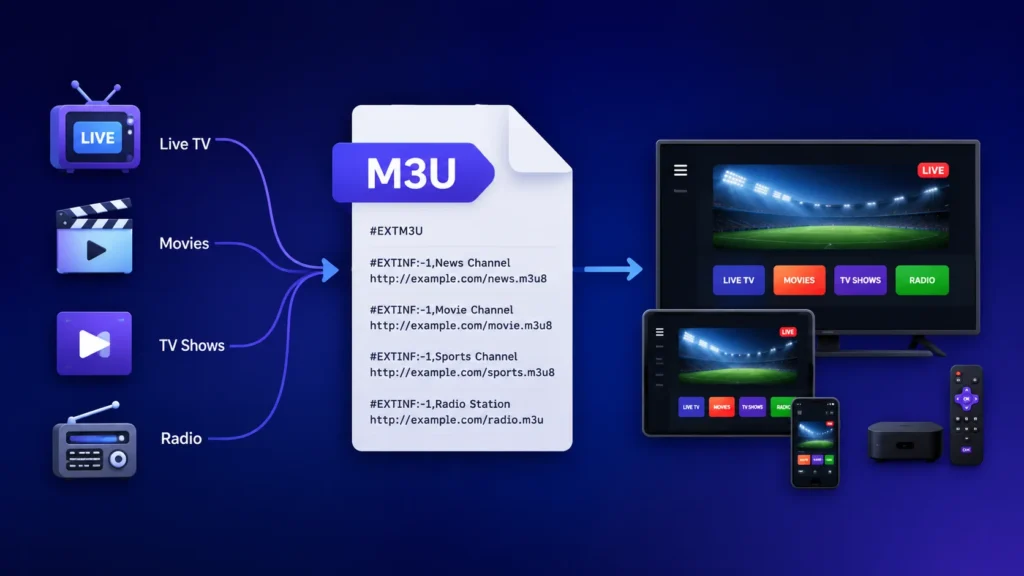
A basic M3U playlist looks like this:
#EXTM3U
#EXTINF:-1 tvg-id="channel.one" tvg-logo="https://example.com/logo.png" group-title="News",Channel One
https://example-server.com/live/channel1/index.m3u8
Two lines describe every channel: the #EXTINF line carries metadata (name, logo, category), and the line beneath it is the actual stream address, usually ending in .m3u8 (an HLS stream) or .ts (a raw transport stream).
Your IPTV URL, in this context, is simply the single link your provider gives you that points to this text file. Paste that one URL into your player, and it automatically pulls in every channel on the list — no manual entry required. Because the file lives on the provider’s server, they can update, add, or remove channels at any time without you having to do anything on your end.
IPTV URL: M3U vs. MAC Address — What’s the Real Difference?
Not every IPTV provider hands you an M3U link. Some instead ask for your device’s MAC address, paired with a “portal URL.” This is a completely different authentication method, and understanding which one you’re dealing with will save you a lot of setup headaches.
M3U URL
- A static, provider-hosted text file containing stream links.
- Works on nearly any device or player (phone, Smart TV, computer, Fire Stick).
- You can switch players or devices freely — just paste the same URL.
- The URL itself often contains your account credentials, so it shouldn’t be shared.
- If your provider changes servers, your old M3U link may stop working until they send a new one.
MAC Address (Stalker Portal / Ministra)
- Authentication is tied to your device’s unique hardware identifier (a 12-character string like
00:1A:79:5B:3C:8E) rather than a username or file. - Common on MAG set-top boxes, Formuler boxes, and emulator apps like STB Emu.
- The provider registers your MAC address on their server; once it’s approved, the box connects automatically with no login screen.
- Very difficult to use on multiple devices at once — most providers detect and block “cloned” MAC addresses.
- Channel lists, EPG, and updates are pushed from the server in real time, so there’s no file to refresh manually.
Bottom line: if you want flexibility across phones, tablets, Smart TVs, and computers, an M3U URL is the more practical choice. If you already own MAG or Formuler hardware, or your provider specifically issues portal credentials, MAC-based activation is simpler to set up once and largely maintenance-free afterward. Neither format is inherently “better” — it comes down to what your provider supports and how many devices you need to use.
What Is “IPTV GitHub”? (And What Is iptv-org?)
Searches like “IPTV M3U GitHub” almost always lead to one project in particular: iptv-org, an open-source, community-maintained repository that catalogs publicly available, free-to-air channel streams from broadcasters around the world. It’s organized by country, category, and language, and it’s updated by contributors who verify that each link is legitimately public — think government broadcasters, news channels, and other stations that already stream for free on the open web.
That’s an important distinction, because “IPTV GitHub” is also used loosely to describe a much larger, murkier category: random repositories and personal gists where people dump M3U files scraped from paid subscription services or pirated re-streams of premium cable and satellite channels. These lists are usually short-lived (streams get taken down within days), unmaintained, and frequently redistribute content the uploader has no right to share.
Before loading any GitHub-sourced playlist, it helps to ask:
- Is the content actually free-to-air, or is it a paid channel someone re-streamed without authorization? If a list includes premium sports networks, cable channels, or pay-per-view events for free, that’s a strong signal it’s unauthorized.
- How recently was it updated, and how many people maintain it? Abandoned repos are the main reason free M3U links “die” within a day or two.
- Does it ask you to run a script, download an executable, or enter credentials on a third-party site? A genuine M3U file is plain text — nothing more.
Why Free “M3U Playlist” Links Are So Unreliable
Search terms like “m3u playlist url isitis,” “https tvpass org playlist m3u,” and “most popular m3u links shared online” reflect a real (and very common) desire: free access to live TV without a subscription. The uncomfortable truth is that most of these sources fall into one of three buckets:
- Legitimate free-to-air aggregators (like iptv-org) that only list content the broadcaster already makes available for free — these are safe from a copyright standpoint but limited to public/local channels, not premium sports or movie networks.
- Gray-market or pirated re-streams of paid content, often shared via Telegram, Pastebin, or short-lived GitHub gists. These links break constantly, carry real legal risk depending on your jurisdiction, and are a favorite vector for malware and phishing pages disguised as “playlist validators.”
- Bait-and-switch pages that promise a working playlist but actually redirect to ad networks, fake app downloads, or data-harvesting forms.
If you test a free playlist, do it in a disposable environment (a browser tab or VLC, not a device with saved passwords), never enter account credentials on a site claiming to “activate” your M3U link, and treat any list promising premium sports or first-run movies for free with heavy skepticism.
M3U for Soccer and Sports: What to Know
“M3U playlist soccer” is one of the most-searched IPTV terms, and for good reason — live sports is the single biggest driver of IPTV demand. A few practical notes if sports is your priority:
- Free soccer M3U links are the most aggressively taken down, since live sports rights are tightly enforced by leagues and broadcasters. Expect frequent dead links.
- Legitimate paid IPTV services generally offer far more stable sports coverage because they license or properly re-distribute the feeds, and they can be held accountable for uptime.
- If sports is your main use case, it’s worth comparing dedicated options rather than chasing free lists — we cover this in more depth in our guide to the best IPTV for sports.
“Home Telecom M3U” — ISP-Provided IPTV
Some regional internet and telecom providers issue their own M3U links as part of a bundled TV package — this is what people usually mean by “home telecom M3U.” These are typically the safest kind of M3U you’ll encounter, since:
- The channels are properly licensed by the telecom company.
- The link is tied to your account and support is available if something breaks.
- There’s no ambiguity about legality — you’re paying for a service your ISP is authorized to provide.
If your internet provider offers this option, it’s usually a more dependable starting point than a free playlist found online.
Is IPTV (and M3U) Legal?
The M3U format itself is completely legal — it’s just a text file, no different from a bookmarks list. What determines legality is the content the links point to and whether the person distributing it has the rights to do so:
- Streaming from a broadcaster’s own free public feed (news, local TV, government channels) is generally fine.
- Subscribing to a legal IPTV provider that has licensing agreements with content owners is the straightforward, low-risk path.
- Accessing paid cable/satellite channels or live sports through unauthorized re-streams — whether via a “free M3U list,” a GitHub gist, or a MAC-activated reseller — usually involves someone in the chain violating copyright law, and enforcement varies significantly by country.
If you want to explore IPTV without wading through gray-market lists, it’s worth reading our breakdown of legal IPTV providers, and most reputable services offer an IPTV free trial so you can test channel quality and stability before paying for a subscription.
Choosing a Reliable M3U Source: A Quick Checklist
- The provider is a real business with support contacts, not just a Telegram handle.
- You get a trial period before paying.
- The channel list is realistic — no “50,000 channels including every premium network for $5/year” claims.
- The service explains whether you’re getting an M3U URL, Xtream Codes login, or MAC/Stalker Portal activation, and matches that to your device.
- You can test it (via a trial or a demo playlist) before committing.
Frequently Asked Questions
What does M3U stand for?
M3U originally stood for “MP3 URL.” It was built for audio playlists in the 1990s and later adopted by the IPTV industry because of how simple and universally supported it is.
Is an M3U URL the same as a MAC address?
No. An M3U URL is a link to a text file listing channel streams; a MAC address is a hardware identifier used by portal-based systems (like Stalker Portal/Ministra) to authenticate a specific device instead of a file or login.
What is IPTV M3U GitHub?
It usually refers to open-source repositories — most notably iptv-org — that catalog free-to-air, publicly available channel streams in M3U format. It’s a different category from unofficial gists sharing pirated re-streams of paid channels.
Why do free M3U links stop working so quickly?
Most free lists rely on re-streamed content that gets taken down for copyright reasons, or on unmaintained servers that simply go offline. Paid, licensed services are far more stable because the provider has an ongoing incentive (and obligation) to keep the stream running.
Is it safe to use a random M3U link I found online?
Treat unknown sources with caution. Avoid entering credentials on third-party “validator” sites, don’t download any executable file claiming to be a playlist, and use a reputable, licensed provider if reliability and legality matter to you.

10 Responses
I appreciate the detailed comparison. It made choosing the right option much easier for me.
This helped me avoid common mistakes.
Very valuable information.
Great tips throughout the article.
This answered almost everything I wanted to know.
Thanks for sharing your expertise.
Fantastic guide from start to finish.
Looking forward to reading more articles on your blog.
This was a very informative article. I appreciated how each point was explained clearly without unnecessary jargon. Looking forward to reading more IPTV guides like this.