
If you’ve ever wondered how a live camera feed, a cable box, or a satellite receiver turns into a channel you can watch on a phone or a smart TV app, the answer is an IPTV encoder. It’s the piece of hardware (or software) that sits between a video source and the network, converting raw video into a compressed, streamable format. Whether you’re building a small hotel TV system or running a full IPTV channel lineup, understanding how encoders work will save you money and headaches.
What Is an IPTV Encoder?
An IPTV encoder takes a video signal — from a camera, set-top box, satellite receiver, or media player — and compresses it into a digital stream that can travel over an IP network. Instead of sending raw, uncompressed video (which would require enormous bandwidth), the encoder compresses the signal using a codec like H.264 or H.265/HEVC, then packages it into a streaming format such as HLS, RTMP, or SRT.
In practical terms, IPTV encoders are the reason a single satellite dish or camera feed can be turned into a live channel that thousands of viewers watch simultaneously on set-top boxes, mobile apps, or smart TVs. If you’re comparing IPTV providers or trying to understand how a service delivers its channel lineup, it helps to first understand the best IPTV service providers that rely on this kind of encoding infrastructure behind the scenes.
How an IPTV Encoder Works
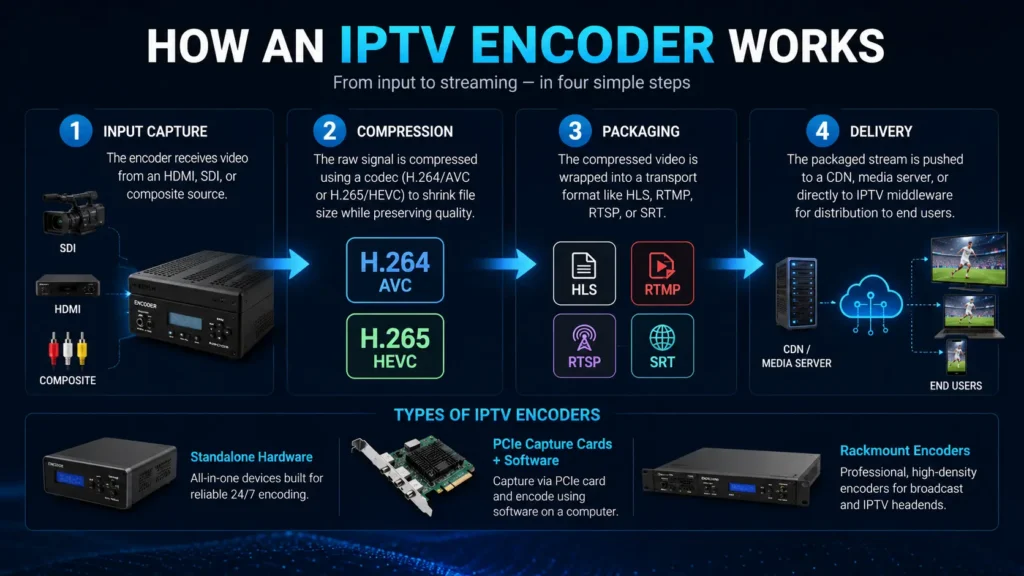
At a high level, the encoding process follows four steps:
- Input capture — the encoder receives video from an HDMI, SDI, or composite source.
- Compression — the raw signal is compressed using a codec (H.264/AVC or H.265/HEVC) to shrink file size while preserving quality.
- Packaging — the compressed video is wrapped into a transport format like HLS, RTMP, RTSP, or SRT.
- Delivery — the packaged stream is pushed to a CDN, media server, or directly to IPTV middleware for distribution to end users.
Encoders can be standalone hardware boxes, PCIe capture cards paired with encoding software, or rackmount units built for professional broadcast use.
HDMI Encoder for IPTV
An HDMI encoder for IPTV is the most common entry point for small-to-mid-sized IPTV operations because HDMI is the standard output on cameras, cable boxes, gaming consoles, and media players. An HDMI to IPTV encoder simply plugs into that HDMI output and converts it into a network stream.
Key things to look for in an HDMI IPTV encoder:
- Resolution support — 1080p is standard; many newer units support 4K input and output.
- Codec support — H.264 for compatibility, H.265/HEVC for bandwidth savings.
- Streaming protocols — RTMP for platforms like YouTube/Facebook, HLS for adaptive playback, SRT for reliable low-latency delivery over unstable networks.
- Channel density — single-channel units for one source, or multi-channel boxes for several feeds at once.
SDI IPTV Encoder
Broadcast and production environments typically rely on an SDI IPTV encoder rather than HDMI, since SDI (Serial Digital Interface) is the professional standard for transmitting uncompressed video over longer cable runs without signal degradation. SDI encoders are common in TV studios, sports production trucks, and cable headends feeding into an IPTV video encoder chain before distribution.
SDI encoders often support:
- Longer cable distances than HDMI (up to 100+ meters over coax vs. a few meters for HDMI)
- Embedded audio de-embedding
- Genlock/timecode sync for multi-camera setups
Some professional-grade encoders offer both HDMI and SDI inputs on the same unit, giving operators flexibility to mix consumer and broadcast-grade sources.
4K HEVC HDMI Encoders with Low-Latency SRT
For operators streaming live sports, events, or premium content, a 4K HEVC HDMI encoder with low-latency SRT support has become the go-to setup. Here’s why each piece matters:
- 4K resolution delivers the sharper picture viewers now expect, especially for sports and live events.
- HEVC (H.265) compression cuts bitrate roughly in half compared to H.264 at the same visual quality, which matters a lot when you’re distributing dozens of channels.
- Low latency keeps the delay between the live source and the viewer’s screen to a second or two, rather than the 15-30+ seconds common with standard HLS delivery — critical for live sports where viewers don’t want their neighbor’s cheer to arrive before the goal does.
- SRT (Secure Reliable Transport) is an open-source protocol designed to recover packet loss and maintain stream stability over unpredictable internet connections, making it a favorite for contribution feeds between an encoder and a streaming origin server.
This combination is especially relevant if you’re comparing providers that prioritize live sports coverage — see our breakdown of the best IPTV for sports for how stream quality and latency affect the viewing experience.
Multi-Channel Encoders: 8-Channel HDMI Encoders for M3U8/HLS
Larger IPTV operations rarely run one encoder per channel — it isn’t cost- or space-efficient. Instead, they use multi-channel units like an 8-channel HDMI encoder for IPTV M3U8 HLS, which accepts up to eight HDMI inputs and outputs eight independent HLS or M3U8 streams from a single rackmount box.
Benefits of multi-channel encoders:
- Lower cost per channel compared to eight separate single-channel units
- Centralized configuration and monitoring through one web interface
- Shared power supply and network connection, simplifying headend design
These are typically used by IPTV panel operators building out full channel lineups, similar to what you’d find when comparing top-rated IPTV services that offer hundreds of live channels.
PVI Encoders and Other IPTV Encoder Brands
Among the many hardware manufacturers, PVI encoders for IPTV are one of several brands operators encounter when sourcing equipment, alongside other established names in the video encoding space. When evaluating any IPTV encoder brand, the underlying questions stay the same regardless of manufacturer:
- Does it support the codec and resolution you need (H.264/H.265, up to 4K)?
- Does it output the protocols your middleware or CDN requires (HLS, RTMP, SRT, RTSP)?
- Is there reliable firmware support and a responsive vendor for troubleshooting?
- Does the channel density match your current and near-future channel count?
Software vs. Hardware IPTV Encoders
Not every IPTV video encoder is a physical box. Software encoders (like OBS, FFmpeg, or vMix) run on a PC or server and use capture cards to bring in HDMI/SDI signals, then encode using the computer’s CPU or GPU. This route offers more flexibility and lower upfront cost but demands more hands-on configuration and a dedicated machine.
Hardware encoders, by contrast, are purpose-built appliances: plug in the source, configure the output over a web interface, and the unit handles the rest with dedicated encoding chips. They’re generally more reliable for 24/7 operation and easier to deploy at scale, which is why most commercial IPTV headends lean hardware for their core channel encoding.
Choosing the Right IPTV Encoder for Your Setup
| Use Case | Recommended Encoder Type |
|---|---|
| Home streaming / small IPTV setup | Single-channel HDMI encoder, H.264/H.265 |
| Live sports / low-latency events | 4K HEVC HDMI encoder with SRT support |
| Broadcast studio / production truck | SDI IPTV encoder with genlock support |
| Full channel lineup / IPTV panel | 8-channel (or higher) rackmount encoder for M3U8/HLS |
| Budget-conscious or flexible setup | Software encoder + capture card |
If you’re just getting started and want to test how a channel lineup looks before investing in encoding hardware, many providers offer a free IPTV trial so you can evaluate stream quality and channel variety first.
Frequently Asked Questions
-
What is the difference between an HDMI encoder and an SDI encoder for IPTV?
HDMI encoders are built for consumer-grade sources over short cable runs, while SDI encoders are designed for professional broadcast environments, supporting longer cable distances and studio-grade signal integrity.
-
Why does IPTV encoding use HEVC instead of H.264?
HEVC (H.265) achieves similar visual quality at roughly half the bitrate of H.264, which reduces bandwidth costs significantly when streaming many channels or delivering 4K content.
-
Is SRT better than RTMP for IPTV streaming?
SRT is generally better for unstable or long-distance network paths because it actively recovers lost packets and maintains lower, more consistent latency, while RTMP is simpler and widely supported but less resilient to packet loss.
-
Can one encoder handle multiple channels at once?
Yes. Multi-channel encoders, such as 8-channel HDMI units, can take several independent HDMI inputs and output separate HLS or M3U8 streams for each channel from a single device.
-
Do I need a hardware encoder, or can I use software?
Both work. Hardware encoders are more reliable for continuous, unattended operation, while software encoders offer more flexibility and lower upfront cost for smaller or more experimental setups.
For more on how IPTV streams are structured and delivered, see our guide on M3U playlists vs. MAC address authentication, or explore our comparison of the best IPTV service providers.
